Cash Flow Frog logo
Cash Flow Frog vs Dryrun

Cash flow forecasting built Dryrun

Dryrun and Cash Flow Frog both turn your accounting data into a forward cash flow forecast with scenario modeling. They differ in pricing transparency, the range of platforms they connect to, their automation and AI features, and how you get started. This page lays out both, fairly, so you can decide which fits your business.
14-day free trial • No credit card required • 1-on-1 onboarding included

Connect with

XeroQuickBooksSageZohoFreshBooksPlaidOdooClaude
The short version

Which tool fits your situation

Both tools forecast cash flow and model scenarios. The real split is who they are built for. Dryrun is aimed at enterprise finance teams on large ERPs. Cash Flow Frog is built for small and mid-size businesses that want to start today. Here is the honest split.

Dryrun is the better fit if

You are an enterprise running NetSuite or Dynamics 365

  • Your business runs on Oracle NetSuite or Microsoft Dynamics 365 Business Central
  • Scenario modeling with many stacked what-if layers is your single biggest need
  • You want sales-pipeline data from Pipedrive plotted alongside cash flow
  • You have budget for a custom-quoted plan and an implementation process
Cash Flow Frog is the better fit if

You want to forecast in depth, and start today

  • You need to see what drives your cash: break the forecast down by vendor, customer, class, location, department, or project
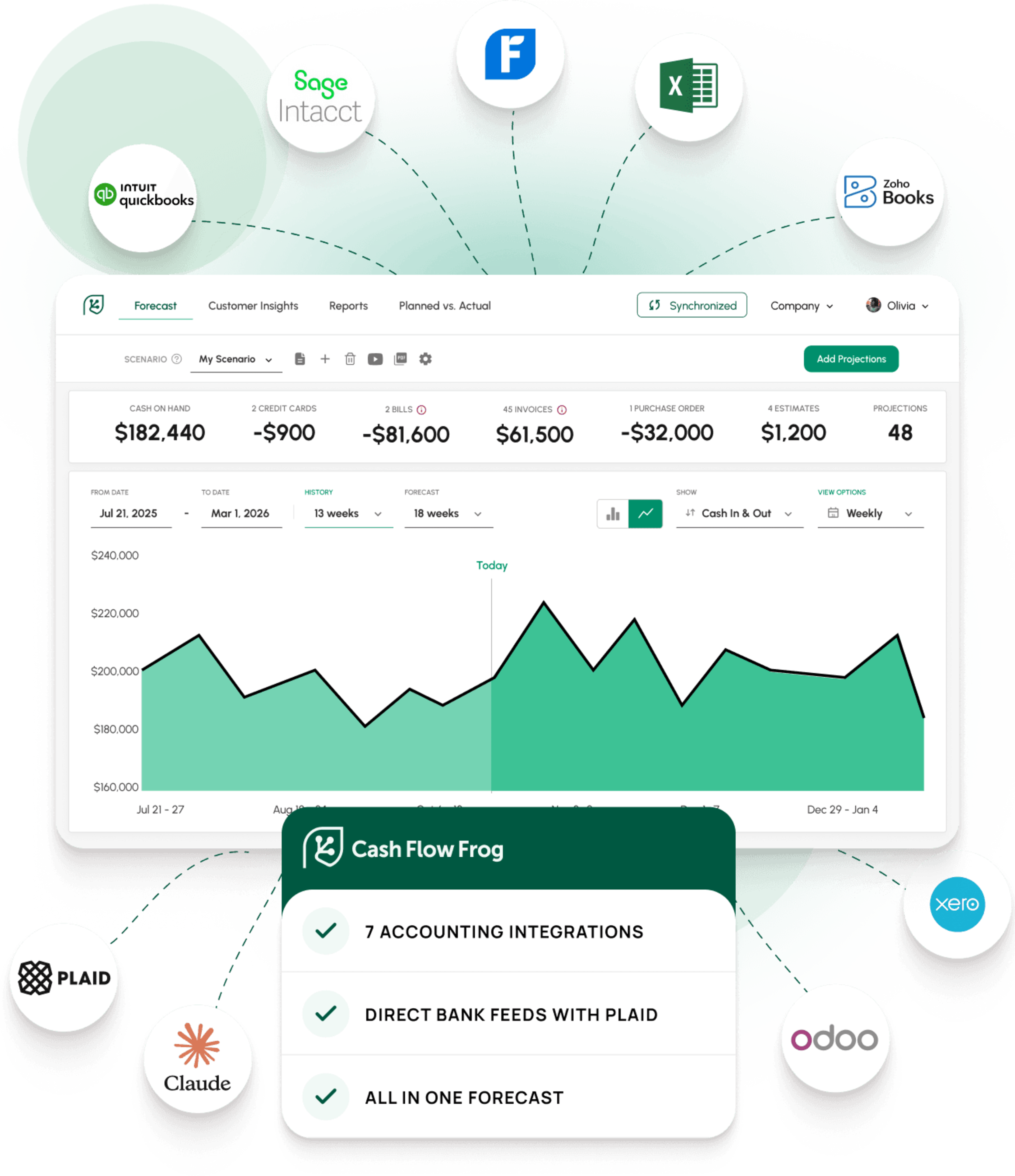
  • You are on QuickBooks Online or Desktop, Xero, Sage Intacct, Zoho Books, FreshBooks, or Odoo
  • You want the option to connect directly to your bank via Plaid
  • You want AI projection suggestions, rule-based forecasting, and Claude or ChatGPT access via MCP
  • You would rather see published pricing and start a free trial today than book a demo and wait for a quote
  • You want a dedicated forecasting tool with no implementation fee and a 1-on-1 onboarding session included
FEATURE COMPARISON

Cash Flow Frog and Dryrun, side by side

Each row is a concrete capability. Based on publicly available information from dryrun.com and third-party software directories, current as of May 2026.

FeatureDRYRUNCASH FLOW FROG
FORECASTING & HORIZON
Cash flow forecasting horizon
Customizable
Up to 36 months
Scenario / what-if modeling
Unlimited scenario layers
Multiple named scenarios, duplicated from base
Daily / weekly / monthly views
Yes
Yes
Forecast by vendor & customer
Limited
Yes
Cash Flow Statement view (Operating / Investing / Financing)
Project-level
Yes, plus custom tracking categories
Multi-level drill-down on the forecast
Not available
Yes
Multi-entity consolidation
Limited
Three levels deep
Multi-currency forecasting
Included
Included
Multi-currency forecasting
Yes, live conversion
Yes, with consolidated conversion
AUTOMATION & INTELLIGENCE
AI projection suggestions from transaction history
Not available
New patterns detected and suggested after every sync
Rule-based projections (% of revenue, rolling averages, growth rates)
Manual roll-forward
Yes, auto-updating as data syncs
Export / import projections via spreadsheet
Yes
Yes
Zapier integration
Not available
Push projections automatically from external tools
AI assistant access (Claude, ChatGPT via MCP)
Not available
Query and update your forecast from an AI assistant
INTEGRATIONS & SETUP
QuickBooks Online & Xero
Yes
Yes
QuickBooks Desktop
Not available
Yes
Sage Intacct
Yes
Yes
Zoho Books, FreshBooks, Odoo
Not available
Yes
Oracle NetSuite, Microsoft Dynamics 365 Business Central
Yes
Not available
Direct bank feeds (Plaid)
Not available
Yes
CRM / sales pipeline integration
Pipedrive
Via Zapier
Standalone use (manual / Excel / CSV import)
Yes
Yes
1-on-1 onboarding & training session
Implementation, often paid
Included
Self-serve start (no demo required)
Demo typically required
Yes
Free trial
14 days, no card
14 days, no card
Pricing
Quote-based, custom tiers
Published flat tiers

Based on publicly available information from dryrun.com and third-party software directories, current as of May 2026. Feature availability and pricing change over time, so verify current detail at dryrun.com. The ✓ / ~ / ✗ marks indicate full availability, partial or conditional availability, and no availability respectively.
Where they differ most

Four differences worth understanding

Most of the table above clusters into four real distinctions, including what Dryrun does well.

01
pricing transparency

Pricing transparency

Cash Flow Frog publishes flat-rate pricing by revenue band: $69/month up to $1M in revenue, scaling to $249/month above $20M, with annual billing 20% lower. You know the cost before you sign up, there is no implementation fee, and a 1-on-1 onboarding session is included. For most small and mid-size businesses, it is both the lower-cost option and the more predictable one.

Dryrun: lists an entry Business plan at $249/month on an annual contract, with three users and a single entity. Its Enterprise and Advisor tiers are quote-based and not publicly listed, and third-party reviews report implementation costs on top. For a larger enterprise with a procurement process, a custom quote is normal and not a drawback. It is simply a different buying model.
02
Flexible integration

Which platforms each one connects to

Cash Flow Frog connects to seven accounting platforms: QuickBooks Online, QuickBooks Desktop, Xero, Sage Intacct, Zoho Books, FreshBooks, and Odoo. It also connects directly to your bank through Plaid, and it can run standalone on manual or spreadsheet input. These are the platforms most small and mid-size businesses run on.

Dryrun: connects to QuickBooks Online, Xero, Sage Intacct, Oracle NetSuite, Microsoft Dynamics 365 Business Central, and Pipedrive. NetSuite and Dynamics 365 are enterprise ERPs that Cash Flow Frog does not support, so if your finance stack is built on either, Dryrun is the better fit. Dryrun does not connect to QuickBooks Desktop, FreshBooks, Zoho Books, Odoo, or bank feeds.
03
AI Boost

Automation, AI, and assistant access

Cash Flow Frog offers AI projection suggestions from your transaction history, rule-based forecasting, and a Zapier integration. It also connects to Claude and ChatGPT through MCP, so you can query and work with your forecast directly from an AI assistant.

Dryrun: focuses on manual-control scenario modeling and does not currently offer an API, which also means no Zapier integration and no AI-assistant access. Its strength is deliberate, hands-on what-if modeling rather than automation.
04
Simple Start

How you get started

Cash Flow Frog is self-serve: start a 14-day trial, connect your accounting software, and build a forecast in minutes, with a 1-on-1 onboarding session included if you want guidance. No demo required, no waiting on a quote.

Dryrun: typically routes new customers through a booked demo, and ERP-connected plans involve a custom quote and an implementation process. For an enterprise rollout, that structured onboarding can be valuable. For a small business that wants to start today, it is extra steps.
PRICING

How the cost compares

Cash Flow Frog publishes flat-rate pricing by annual revenue band. Dryrun lists an entry Business plan, with higher tiers quote-based. The two starting points tell the story.

DRYRUNCASH FLOW FROG
Starts at$249/month$69/month
Pricing modelBusiness plan listed, higher tiers quote-basedPublished flat tiers by revenue band, 20% lower on annual billing
Implementation feeReported by third-party reviewsNone
Free trial14 days, no card14 days, no card
1-on-1 onboardingImplementation, often paidIncluded

Cash Flow Frog pricing ranges from $69 to $249/month by annual revenue band, monthly billing; annual billing is 20% lower. Dryrun's Business plan price, $249/month on an annual contract with three users and a single entity, is as listed on the QuickBooks App Store, May 2026. It is a starting price. Dryrun's Enterprise and Advisor tiers are quote-based and cost more. Cash Flow Frog starts well below Dryrun and is the lower-cost option for most small and mid-size businesses. Verify current pricing on both providers' websites.

For accountants & bookkeepers

One platform for every client

If you manage cash flow forecasting for a book of clients, the practical question is which tool works for all of them, and what it costs to roll out.

Built for small-business accounting software

Most small-business clients run on QuickBooks Online or Desktop, Xero, Zoho Books, FreshBooks, or Odoo. Cash Flow Frog connects to all seven accounting platforms and to a bank directly via Plaid, so one tool covers your whole book. Dryrun's integration set leans toward enterprise ERPs like NetSuite and Dynamics 365 and skips QuickBooks Desktop, FreshBooks, Zoho Books, and Odoo entirely.

One dashboard, every client

Cash Flow Frog has a dedicated accountants and bookkeepers plan: a multi-client dashboard, one-click switching between client forecasts, and per-client user permissions, all from a single login.

Transparent, predictable pricing

Practice pricing is published and based on the number of client companies, with no custom quote, no implementation fee, and no surprise when you add a client. That makes forecasting straightforward to package and profitable to offer as a service.

Guided 1-on-1 onboarding

Every Cash Flow Frog account includes a 1-on-1 onboarding and training session, so you and your team get set up properly from day one, with forecasts, dimensions, and client files configured the way your practice works.
Common questions

Cash Flow Frog vs Dryrun, answered

Both tools forecast cash flow and model scenarios. The real split is who they are built for. Dryrun is aimed at enterprise finance teams on large ERPs, with quote-based pricing and an implementation process. Cash Flow Frog is built for small and mid-size businesses that want to start today, with seven accounting integrations, AI and rule-based automation, transparent pricing, and no implementation fee. Cash Flow Frog also goes deeper on dimensional breakdowns — by vendor, customer, class, location, department, or project. Dryrun makes most sense for enterprise finance teams whose stack is built on NetSuite or Dynamics 365.

No. Dryrun connects to QuickBooks Online, Xero, Sage Intacct, Oracle NetSuite, and Microsoft Dynamics 365 Business Central, but not QuickBooks Desktop. Cash Flow Frog supports QuickBooks Desktop alongside QuickBooks Online, Xero, Sage Intacct, Zoho Books, FreshBooks, and Odoo. If your business runs on QuickBooks Desktop, Cash Flow Frog is the only option between the two.

Dryrun lists a Business plan at $249/month on an annual contract, covering three users and a single entity. Its Enterprise and Advisor tiers are quote-based and not publicly listed, and third-party reviews report implementation costs on top. Cash Flow Frog publishes flat-rate pricing by annual revenue band: $69/month for revenue up to $1M, scaling to $249/month above $20M, with annual billing 20% lower. There is no implementation fee, and a 1-on-1 onboarding session is included from day one.

Dryrun does not currently offer a public API, which also means no Zapier integration and no AI-assistant access for cash flow forecasting. Its scenario modeling is built around deliberate, manual what-if layers rather than automation. Cash Flow Frog offers AI projection suggestions from your transaction history, rule-based projections that update automatically, a Zapier integration, and access to Claude and ChatGPT through MCP.

For practices managing clients on small-business platforms — QuickBooks, Xero, Zoho, FreshBooks, or Odoo — Cash Flow Frog is the stronger fit. It connects to all seven accounting platforms, has a dedicated multi-client dashboard with per-client permissions, and publishes predictable practice pricing by client count with no implementation fee. Dryrun has an Advisor tier but its integration set leans toward enterprise ERPs, which are less common across a typical small-business book.

Cash Flow Frog is fully self-serve: start a 14-day trial, connect your accounting software, and build a forecast in minutes. A 1-on-1 onboarding session is included if you want guided setup. Dryrun typically routes new customers through a booked demo before access, and its ERP-connected plans involve a custom quote and an implementation process.

Dryrun does not offer a direct export format that maps to Cash Flow Frog projections. However, Cash Flow Frog supports Excel and CSV import for projections, so if you have your forecast data in a spreadsheet you can bring it across. During your free 1-on-1 onboarding call the team can help you rebuild your scenario structure in Cash Flow Frog from your accounting data.

The best way to compare is to try one

Cash Flow Frog connects to your accounting software in minutes and builds a forecast from data you already have. No demo, no quote, no implementation fee. The 14-day trial includes full access.

Start Free Trial

14-day free trial • No credit card required • 1-on-1 onboarding included