Cash Flow Frog logo
Cash Flow Frog vs Float

Cash Flow Frog vs Float

Float and Cash Flow Frog both turn your accounting data into a forward cash flow forecast with scenario modeling. They differ in integrations, automation and AI features, pricing transparency, and how you get started. This page lays out both, fairly, so you can decide what fits your business.
14-day free trial • No credit card required • 1-on-1 onboarding included

Connect with

XeroQuickBooksSageZohoFreshBooksPlaidOdooClaude
The short version

Which tool fits your situation

Both tools forecast cash flow and model scenarios. The real split is depth, integrations, and how quickly you can get started. Here is the honest split, stated upfront.

Float is the better fit if

You want a simple visual forecast and little else

  • Your accounting runs on FreeAgent, which Cash Flow Frog does not support
  • A clean, visual cash flow timeline is the main thing you need
  • You want a polished interface focused on the next 12 months
  • Simple scenario comparisons cover your planning needs
Cash Flow Frog is the better fit if

You want to forecast in depth, and start today

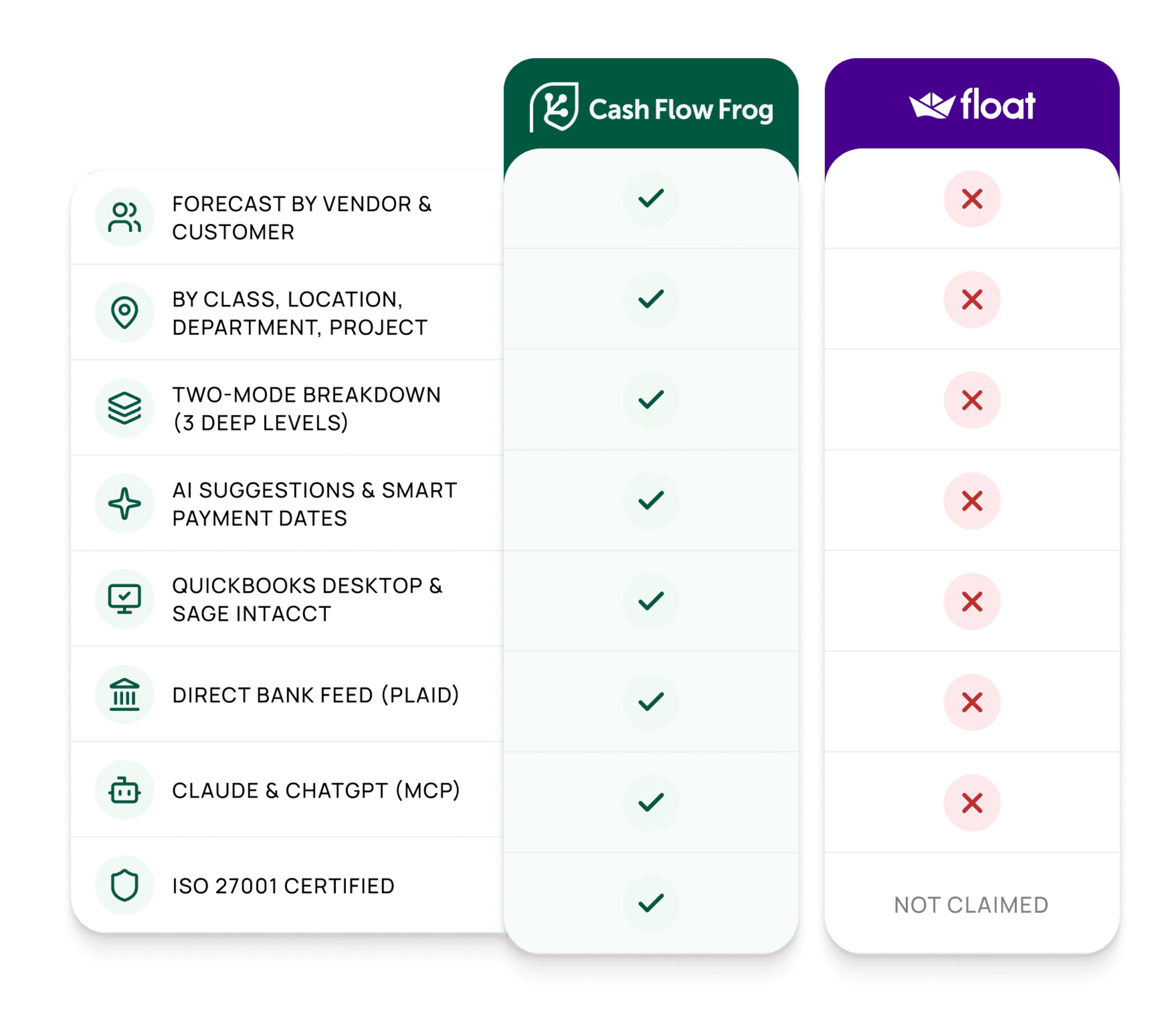
  • You need to break cash flow down by vendor, customer, class, location, department, or project
  • You are on QuickBooks Desktop, Sage Intacct, Zoho Books, FreshBooks, or Odoo, the platforms Float does not support
  • You want AI projection suggestions, rule-based forecasting, and Claude or ChatGPT access via MCP
  • You want a 1-on-1 onboarding session
  • You manage multiple clients and need a dedicated accountants and bookkeepers dashboard
FEATURE COMPARISON

Cash Flow Frog and Float, side by side

Each row is a concrete capability. Based on publicly available information from floatapp.com and third-party reviews, current as of May 2026.

FeatureFLOATCASH FLOW FROG
FORECASTING & SCENARIOS
Forecast horizon
Up to 12 months in the daily view, longer available
36 months rolling
Daily / weekly / monthly views
Yes
Yes, plus quarterly
Scenario / what-if modeling
Multiple scenarios
Named scenarios, duplicated from base, never touch the books
Forecast by vendor & customer
Limited grouping options
Full breakdown by vendor and customer
Forecast by class, location, department, project
Not available
Class, department, location, project, and custom tracking categories
Multi-level drill-down on the forecast
Category-level drill-down
Three levels deep, click any number for source invoices and bills
Cash Flow Statement view (Operating / Investing / Financing)
Not available
Yes
Planned vs actual tracking
Available
Snapshots with drill-down by customer or vendor
Multi-entity consolidation
Available
Unlimited entities in one consolidated view
Multi-currency forecasting
Yes
Native, with consolidated conversion
VAT / GST included in the forecast
Not available
Auto-calculated per filing period, on the expected payment date
AUTOMATION & INTELLIGENCE
AI projection suggestions from transaction history
Not available
New patterns detected and suggested after every sync
Rule-based projections (% of revenue, rolling averages, growth rates)
Yes, with fewer rule types than Cash Flow Frog
Yes, auto-updating as data syncs
Zapier integration
Not available
Push projections automatically from external tools
AI assistant access (Claude, ChatGPT via MCP)
Not available
Query and update your forecast from an AI assistant
Bulk import / export projections
CSV import available
Export, edit offline, re-upload via Excel/CSV
INTEGRATIONS & SETUP
QuickBooks Online & Xero
Yes
Yes
QuickBooks Desktop
Not available
Yes
FreeAgent
Yes
Not available
Sage Intacct
Not available
Yes
Zoho Books, FreshBooks, Odoo
Not available
Yes
Direct bank feeds (Plaid)
Not available
Connect directly to your bank, no accounting software required
Standalone use (manual / Excel / CSV import)
Manual entry and CSV import
Manual entry, Excel/CSV import, or Plaid bank feed
Accountant multi-client dashboard
Multi-company switching available
Dedicated plan: multi-client dashboard, one-click switching, per-client permissions
1-on-1 onboarding & training session
Available on higher plans
Included on the Pro plan
Self-serve start (no demo required)
Yes
Yes, start a trial in minutes
Read-only connection to accounting software
Read-only
Read-only, never writes to your books
Free trial
14-day free trial
14 days, no credit card
Pricing model
By annual revenue, from about $53/month
Published flat tiers by revenue band, from $69/month

Based on publicly available information from floatapp.com and third-party reviews, current as of May 2026. Feature availability and pricing change over time, so verify current detail at floatapp.com. The ✓ / ~ / ✗ marks indicate full availability, partial or conditional availability, and no availability respectively.
Where they differ most

Four differences worth understanding

Most of the table above clusters into four real distinctions, including where Float has the edge.

01
Integrations

Integrations: eight platforms, not three

Cash Flow Frog connects to seven accounting platforms: QuickBooks Online and Desktop, Xero, Sage Intacct, Zoho Books, FreshBooks, and Odoo. It also connects directly to your bank through Plaid, which makes eight platforms in total, and it can run standalone on manual or spreadsheet input. Whatever your business runs on, it is covered.

Float: connects to Xero, QuickBooks Online, and FreeAgent. These cover most UK and ANZ small businesses well. Float does not connect to QuickBooks Desktop, Sage Intacct, Zoho Books, FreshBooks, Odoo, or bank feeds. FreeAgent support is something Cash Flow Frog does not offer, so if you are on FreeAgent, Float is the better fit.
02
AI Boost

Automation, AI, and assistant access

Cash Flow Frog offers AI projection suggestions from your transaction history. After every sync, new patterns are detected and surfaced for you to review. Rule-based projections let you tie expenses to income automatically, for example ad spend at 5% of revenue. A Zapier integration pushes data in from other tools, and it connects to Claude and ChatGPT through MCP, so you can query and update your forecast directly from an AI assistant.

Float: offers rule-based projections too, with a smaller set of rule types. It does not currently offer AI projection suggestions, a Zapier integration, or AI-assistant access. Its strength is a clean, deliberate interface for hands-on cash flow planning.
03
Drill-Down Forecast

Forecast depth: class, vendor, and drill-down

Cash Flow Frog breaks the forecast down by vendor, customer, class, location, department, or project, and lets you switch between them in a click. Click any forecasted figure and drill three levels deep to the source invoices and bills behind it. You see what is driving each number from whichever angle you need.

Float: offers category-level drill-down and can group by some dimensions. It does not break the forecast down by class, department, or location, and does not support a three-level drill-through to source transactions.
04
Pricing Transparency

Pricing transparency and getting started

Cash Flow Frog publishes its pricing by revenue band, from $69/month, with no implementation fee. A 14-day free trial with full access starts immediately, no credit card required. A 1-on-1 onboarding session is included on the Pro plan, so you are set up properly from day one.

Float: also prices by annual revenue, starting around $53/month at the entry band. Its pricing climbs more steeply at higher revenue. Onboarding sessions are available on its higher tiers.
Pricing

How the cost compares

Both tools price by annual revenue. Drag the slider to your revenue and see both side by side.

Your Annual Revenue

$0
$5M
$10M
$15M
$20M+

Cash Flow Frog

Pro
$89/mo
One plan, every feature — 20% off annual
Save $351/mo vs Float

Float

Equivalent Tier
$440/mo
Revenue based pricing

Cash Flow Frog pricing: $69 to $249/month by annual revenue band, monthly billing; annual billing is 20% lower. Float pricing: by annual revenue, monthly billing, based on publicly available information from floatapp.com, May 2026. The slider groups revenue into shared bands for comparison. Verify current pricing on both providers' websites before deciding.

Start Free Trial
14-day free trialNo credit card required1-on-1 onboarding included
For accountants & bookkeepers

One platform for every client

If you manage cash flow forecasting for a book of clients, the practical question is which tool works for all of them, and what it costs to roll out.

Eight platforms, not three

Small-business clients run on QuickBooks Online or Desktop, Xero, Zoho Books, FreshBooks, or Odoo. Cash Flow Frog connects to all seven accounting platforms and to a bank directly via Plaid. Float covers Xero, QuickBooks Online, and FreeAgent, so if a client is on anything else you need a second tool.

One dashboard, every client

Cash Flow Frog has a dedicated accountants and bookkeepers plan: a multi-client dashboard, one-click switching between client forecasts, and per-client permissions, all from a single login. Float offers multi-company switching but is not structured as a dedicated practice tool.

Transparent, predictable pricing

Practice pricing is published and based on the number of client companies, with no custom quote and no surprise when you add a client. That makes cash flow forecasting straightforward to package and offer as a service.

Guided 1-on-1 onboarding

Every Cash Flow Frog account includes a 1-on-1 onboarding and training session, so you and your team get set up properly from day one, with forecasts, dimensions, and client files configured the way your practice works.
Common questions

Cash Flow Frog vs Float, answered

Both tools connect to your accounting software and build a forward cash flow forecast with scenario modeling. The differences come down to integrations, automation, forecast depth, and price. Cash Flow Frog connects to seven accounting platforms, including QuickBooks Desktop, Sage Intacct, Zoho Books, FreshBooks, and Odoo, plus direct bank feeds via Plaid, while Float supports Xero, QuickBooks Online, and FreeAgent. Cash Flow Frog adds AI projection suggestions after every sync, a wider set of rule-based projection types, a Zapier integration, and access from Claude and ChatGPT via MCP. It also breaks the forecast down by vendor, customer, class, location, department, or project, and lets you drill three levels to the source invoice or bill. Float is a strong tool for Xero and QuickBooks Online businesses that want a clean visual forecast.

No. Float connects to Xero, QuickBooks Online, and FreeAgent. It does not support QuickBooks Desktop, Sage Intacct, Zoho Books, FreshBooks, or Odoo. Cash Flow Frog supports all seven of those platforms, plus direct bank feeds via Plaid. If your business runs on any platform Float does not cover, Cash Flow Frog is the only option between the two.

No. Cash Flow Frog connects to your accounting software via a read-only integration. It reads your invoices, bills, and bank transactions to build the forecast, but it never writes, edits, or deletes anything in your books. Your accounting data is always unchanged.

Float offers rule-based projections with a smaller set of rule types than Cash Flow Frog. It does not currently offer AI projection suggestions, a Zapier integration, or AI-assistant access. Cash Flow Frog offers all three: AI suggestions surfaced after every sync, a Zapier integration for pushing projections from other tools, and access from Claude and ChatGPT through MCP.

Yes. Cash Flow Frog breaks the forecast down by vendor, customer, class, location, department, project, and any custom tracking category from your accounting software. You can switch between dimensions in a click and drill three levels deep from any forecasted number to the source invoices and bills behind it. Float offers category-level grouping but does not support class, department, or location breakdowns, or a three-level drill-through to source transactions.

Float starts at around $53/month and Cash Flow Frog starts at $69/month, so Float has a lower entry price. At higher revenue bands the gap narrows sharply and reverses — at the $5M revenue level, Float is listed at around $603/month while Cash Flow Frog is $129/month. Verify current pricing on both providers' websites before deciding.

Yes. Cash Flow Frog has a dedicated accountants and bookkeepers plan with a multi-client dashboard, one-click switching between client forecasts, and per-client user permissions, all from a single login. Each client connects their own accounting software — or any mix of the seven supported platforms. Float offers multi-company switching but is not built as a dedicated practice tool.

The best way to compare is to try one

Cash Flow Frog connects to your accounting software in minutes and builds a forecast from data you already have. No demo, no implementation fee. The 14-day trial includes full access.

Start Free Trial

14-day free trial • No credit card required • 1-on-1 onboarding included