
Cash Flow Frog logo
Cash Flow Frog vs QuickBooks

Cash flow forecasting built beyond QuickBooks

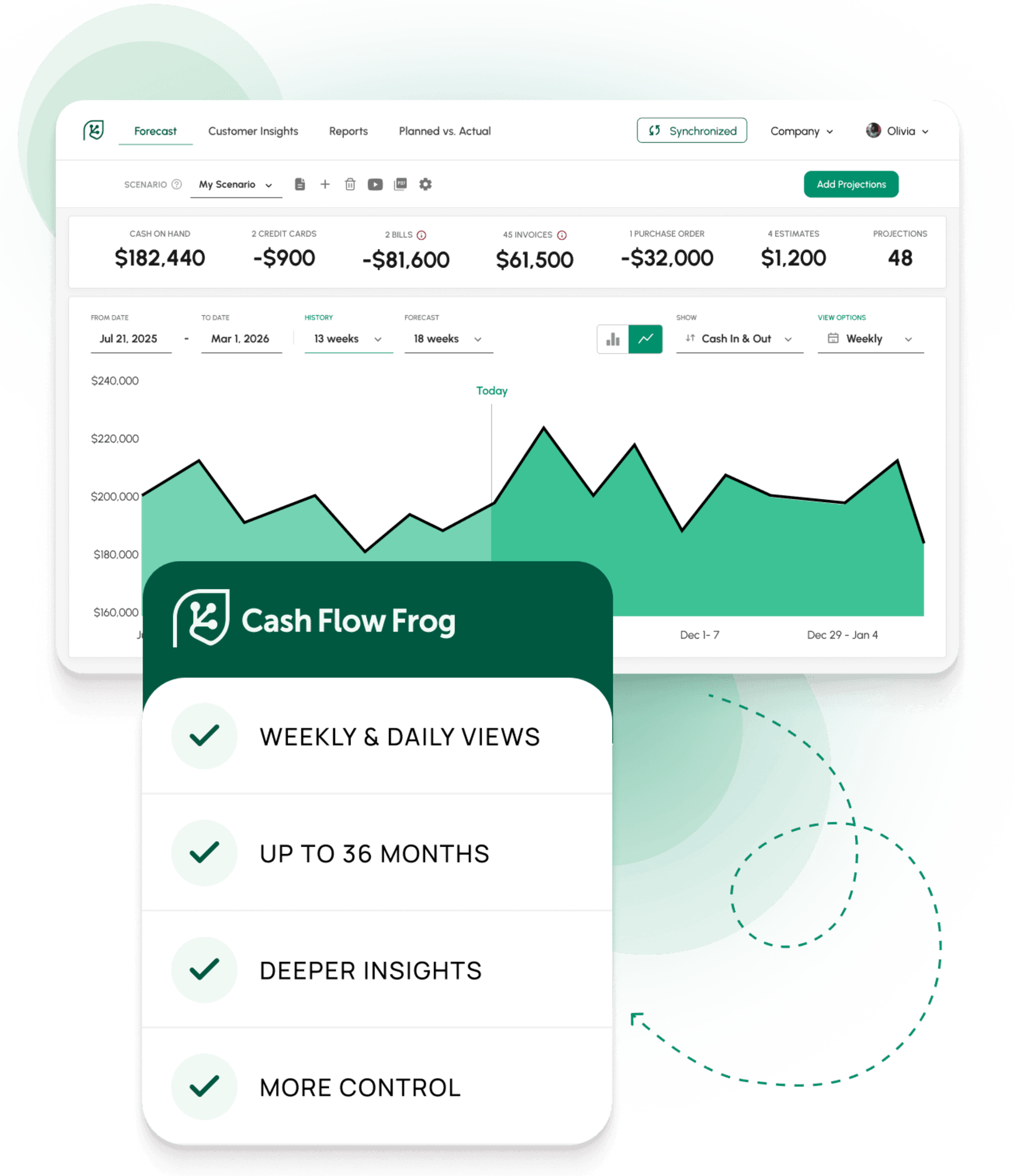
QuickBooks Cash Flow Planner shows your cash month by month. Cash Flow Frog forecasts the same QuickBooks data daily and weekly too, up to three years out, so you can run a 13-week cash flow and see which week cash gets tight. It adds what the planner has no place for: scenario modeling, breakdowns by vendor, customer, and class, rule-based projections, and multi-entity consolidation. This page compares both, fairly, so you can decide what fits your business.
14-day free trial • No credit card required • 1-on-1 onboarding included

Connect with

XeroQuickBooksSageZohoFreshBooksPlaidOdooClaude
VERDICT

Which tool fits your situation

Both verdicts stated upfront. Read this before the rest of the page.

Choose QuickBooks Cash Flow Planner if

Short-term cash visibility inside QuickBooks is enough

  • Your planning horizon is the next two years or less
  • You want a quick read on cash without leaving QuickBooks
  • Your business runs on a single QuickBooks company
  • Adding and adjusting a few future events covers your what-if planning
Choose Cash Flow Frog if

You plan further out, or need more depth

  • You forecast three years ahead, or need the months in between in real depth
  • You need the forecast broken down by vendor, customer, class, location, department, or project
  • You want rule-based projections and AI suggestions, not manual entry alone
  • You run multiple QuickBooks companies or currencies
  • You want to connect the forecast to Zapier, Claude, or ChatGPT
  • Your accountant manages cash flow across several QuickBooks clients
FEATURE COMPARISON

Side by Side

Each row is a concrete cash flow forecasting capability, not a marketing line.

FeatureQUICKBOOKS CASH FLOW PLANNERCASH FLOW FROG
FORECASTING & HORIZON
Forecasting horizon
Up to 24 months, in the Cash Flow Planner
36 months rolling
Daily / weekly / monthly views
Monthly cash flow view
Daily, weekly, monthly, and quarterly
Scenario / what-if planning
Add or adjust one-off and recurring transactions by hand
Named scenarios, duplicated from base, compared side by side
Drill from a forecast figure to the source invoice or bill
Drill-down available, limited depth
Three levels deep to source invoices and bills
CASH FLOW DEPTH
Forecast breakdown by vendor & customer
Not in the Cash Flow Planner
Yes
Forecast breakdown by class, location, department, project
Not in the Cash Flow Planner
Yes, including QuickBooks Classes
Cash Flow Statement view (Operating / Investing / Financing)
Statement of Cash Flows is a historical report
Yes
Planned vs actual tracker
Budget vs Actuals, on a profit-and-loss basis
Cash-basis snapshots, drill-down by customer or vendor
Multi-entity consolidation
One company per QuickBooks account
Unlimited entities in one consolidated view
Multi-currency on the forecast
Not consolidated in the Cash Flow Planner
Native, with consolidated conversion
VAT / GST included in the forecast
Not in the Cash Flow Planner
Auto-calculated per filing period, on the expected payment date
AUTOMATION & INTELLIGENCE
Rule-based projections (% of revenue, rolling averages, growth rates)
Not available
Yes, auto-updating as data syncs
AI projection suggestions from transaction history
Not available
New patterns detected and suggested after every sync
Zapier integration
Not available
Push projections automatically from other tools
AI assistant access (Claude, ChatGPT via MCP)
Not available
Query and update the forecast from an AI assistant
Export / import projections via spreadsheet
Not available
Export, edit offline, re-upload to apply
Choose which bank and GL accounts feed the forecast
Yes
Include or exclude any account
INTEGRATIONS & SETUP
Works inside QuickBooks
Native to QuickBooks Online
Read-only connection, never writes to QuickBooks
Customer payment insights
Accounts Receivable Aging
Ranked by sales, collections, and payment timing
Standalone use (no accounting software)
Requires a QuickBooks account
Manual entry, Excel/CSV import, or Plaid bank feed
Connects to other accounting platforms
QuickBooks only
QuickBooks Desktop, Xero, Sage Intacct, Zoho Books, FreshBooks, Odoo
Accountant multi-client dashboard
QuickBooks Online Accountant switches clients, no unified cash dashboard
One dashboard, one-click client switching, per-client permissions
1-on-1 onboarding session
Help centre and support
Included on the Pro plan
Free trial
Cash Flow Planner included with QuickBooks Online
14 days, no credit card

Comparison covers cash flow forecasting only. Based on publicly available information from Intuit, current as of May 2026. Intuit updates QuickBooks Online frequently, so verify current detail at quickbooks.intuit.com. The ✓ / ~ / ✗ marks indicate full availability, partial or conditional availability, and no availability for cash flow forecasting respectively.
FOUR KEY DIFFERENTIATORS

Where the gap is widest

Each one is a concrete capability, not an adjective. Xero Analytics is a capable short-term tool. These are the jobs it was not built to do.

01
FLEXIBLE FORECASTING

Daily and weekly, not just monthly

Cash Flow Frog forecasts daily, weekly, monthly, or quarterly, on a rolling 36-month horizon. A monthly figure hides the timing inside the month. With weekly and daily views you can run a 13-week cash flow, see which week a payroll run or a tax payment lands, and know whether cash holds up between now and then.

QuickBooks Cash Flow Planner: shows your cash position month by month, up to 24 months ahead. It is a clear monthly read, without a daily or weekly view of the timing inside each month.
02
DRILL-DOWN FORECAST

A forecast you can break apart

Break the forecast down by vendor, customer, class, location, department, project, or any custom QuickBooks Class. Click any forecasted figure and drill three levels deep to the invoices and bills behind it. You see what is driving each number.

QuickBooks Cash Flow Planner: shows your overall cash position. It does not break the forecast down by Class, vendor, or project, or drill from a forecast figure to source transactions.
03
AUTO PROJECTIONS

Projections that build themselves

Cash Flow Frog creates projections from rules: a percentage of revenue, a rolling average, a fixed growth rate, or a set amount, all updating on their own as new data syncs. After every sync it detects new patterns in your transaction history and suggests projections for you to review.

QuickBooks Cash Flow Planner: predicts recurring items from your history and lets you add or adjust events by hand. It does not build rule-based projections.
04
CONNECTED WORKFLOW

A forecast connected to your other tools

Cash Flow Frog has a Zapier integration, so projections can flow in automatically from the other tools you run. It also connects to Claude and ChatGPT through MCP, so you can ask questions about your forecast and update it directly from an AI assistant.

QuickBooks Cash Flow Planner: lives inside QuickBooks. It has no Zapier integration and no AI-assistant access for cash flow forecasting.
For Accountants & Bookeepers

A forecasting layer for every client

The Cash Flow Planner gives each client a short-term cash view inside their own file. Cash Flow Frog adds depth and a longer horizon, and brings every client into one place.

One dashboard, every client

A multi-client dashboard with one-click switching between client forecasts and per-client user permissions, all from a single login.

Whatever software each client runs

Clients on QuickBooks Online or Desktop, Xero, Sage Intacct, Zoho Books, FreshBooks, or Odoo are all covered, so you are not limited to your QuickBooks clients.

Depth for advisory conversations

Vendor, class, and project breakdowns, scenario tools, and a 3-year horizon give you more to work with when a client conversation turns to runway, payroll timing, or a hiring decision.

Transparent practice pricing

Published pricing based on the number of client companies, with no custom quote and a 1-on-1 onboarding session included.
FROM QUICKBOOKS USERS WHO ADDED CASH FLOW FROG

What changed for them

Sourced from G2, Capterra, and Trustpilot.

"We'd been using QuickBooks for years and never had a real picture of where we'd be in 6 months. Cash Flow Frog connected in minutes and gave us that view without us changing anything in QuickBooks."

Sarah M. · CFO, Professional Services · Capterra

"The scenario planning alone is worth it. I can model what happens if we hire two people in Q3 without ever touching our QuickBooks data. It reads from QuickBooks and lets me experiment freely."

James R. · Founder, SaaS Company · G2

"As a bookkeeper managing 12 QuickBooks clients, the multi-client dashboard changed everything. I can see cash positions across all clients, flag problems early, and have forecasting conversations that add value."

Diane K. · Bookkeeper · Trustpilot

Switching questions

FAQ.

QuickBooks Online's Cash Flow Planner projects your cash position month by month, up to 24 months ahead, and lets you add or adjust future events without changing the books. Cash Flow Frog takes the same QuickBooks data and builds a rolling 36-month forecast you can view daily, weekly, or monthly. It breaks that forecast down by vendor, customer, class, location, department, or project, creates rule-based projections that update on their own, and connects to Zapier, Claude, and ChatGPT. The two work together: the Cash Flow Planner for a quick monthly read, Cash Flow Frog for short-term timing, depth, and longer-range planning.

Your set is set automatically when you connect your accounting software — we read your revenue data directly. You’ll see your assigned price before entering any payment details.

Your set is set automatically when you connect your accounting software — we read your revenue data directly. You’ll see your assigned price before entering any payment details.

Yes. Cash Flow Frog's AI projection suggestions, smart payment dates, and rule-based projections work on every accounting platform we support — QuickBooks Online and Desktop, Xero, Sage Intacct, Zoho Books, and FreshBooks.

Your set is set automatically when you connect your accounting software — we read your revenue data directly. You’ll see your assigned price before entering any payment details.

14 days, full access to every feature, no credit card required. Same length as Float. The difference: every Cash Flow Frog trial includes a free 1-on-1 onboarding call with a Cash Flow Frog expert.

Yes — multi-entity consolidation is included on the Pro plan. Connect each entity to its own accounting platform (they don't need to match), and Cash Flow Frog rolls them up automatically. Float charges separately for multi-company.

Yes. Monthly plans cancel anytime. Annual plans include a 30-day money-back guarantee — if it's not working, we refund you. No questions, no retention calls.

Yes. Monthly plans cancel anytime. Annual plans include a 30-day money-back guarantee — if it's not working, we refund you. No questions, no retention calls.

A monthly read, or a forecast you can work with

QuickBooks Cash Flow Planner gives you a clear monthly read. Cash Flow Frog connects in minutes and adds daily and weekly views, breakdowns by vendor, customer, and class, and automation the built-in tool does not include.

Start Free Trial

14-day free trial • No credit card required • 1-on-1 onboarding included